


Mobile Connectivity in Cuba

What to Know First About the Service
Since December 6, 2018, the mobile internet in Cuba becomes a reality. And it is not something exclusively available for companies or tourists, this time the service is available for everyone. We are not either talking about the wi-fi access in the corresponding areas, since this connectivity was already available, but we mean instead the possibility to get internet in any smartphone from any place in Cuba, including at home. And this also means you can also get internet in your computer, you just have to use a technique called tethering or simply use your smartphone as a wi-fi transmitter or hot spot. Below, we will explain how to do that.
The purpose of this page is to guide everyone interested on the mobile internet connectivity in Cuba, not only about how to configure a smartphone for a connection, but also about the available plans and packages, and also provide several tips.
Etecsa, which is the only phone company in Cuba, already provide these indications, but you have to visit several pages and even websites, in order to get a complete information. We have not found all the information about the mobile internet in Cuba one would need in a single page, therefore we have decided to write this article.
First and foremost, the service only work in smartphones supporting 3G technology, that is, the third generation cell technology, or, said in another way, which understand a frequency of 900 Mhz or superior.
- Juste send an SMS to 2266.
- In the body, write out the first digits of your IMEI code, which generally can be found under the battery of your phone. You can also get your IMEI by composing *#06# and pressing Call, which is a much better option.
- You'll receive an SMS which will say (in Spanish, obviously) whether your device supports the 900 Mhz to operate in the Cuban third generation network or an alternate message telling that it supports it.
How to get the Mobile Data Internet in Cuba
You simply need a Cuban phone SIM card. Contrary to the Nauta email service, you have not to visit an Etecsa office to ask for it, you don't have to sign or show any document. In fact, to be able to connect to the internet, you don't even need a Nauta account (something with has nothing to do with this service, even if it has the same name). Having money in the line is just enough and you just have to compose a number to request the access. If you have used the service during the free tests, you'll get it faster. Otherwise, you'll have to wait 48 hours before getting it.
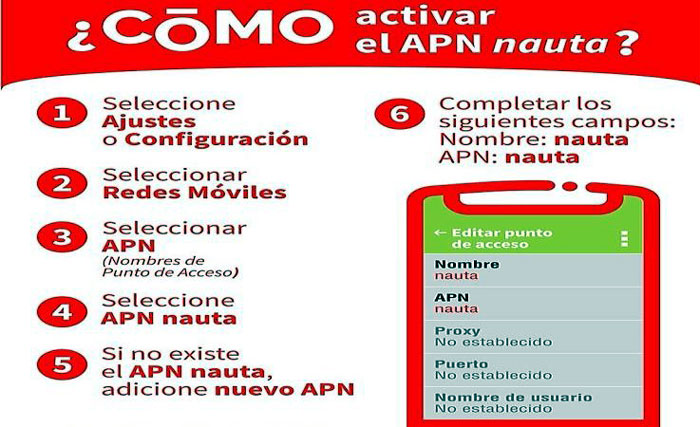
- Have your APN (Access Point Name) configured (see the picture or the explanation below).
- Compose *133# and press Call.
- From the options, choose Datos (data).
- Activate the Default Tariff (Tarifa por consumo) for now.
- Hold on 48 hours to receive the available package offers.
Una vez que su servicio de internet por datos móviles esté activado, debe desactivar la Tarifa por consumo (algo que la propia empresa de telecomunicaciones Etecsa aconseja), porque es bastante alta y podría acabar con su saldo móvil descontroladamente.
Consultar el saldo y el estado de los planes
- Be sure your APN is set up.
- Activate Mobile data.
- Visit https://mi.cubacel.net from your phone.
- Sign-up to the portal.


The Paquetazo of 2025
Since May 30, 2025, ETECSA has implemented a series of tariff measures called "el paquetazo."
But to understand it, we first need some context. For years, ETECSA, in order to collect dollars and other hard currencies, implemented "promotions." This means that if you receive a top-up from outside Cuba, or rather, if you receive a top-up from the internet via international credit cards, you receive bonuses and additional advantages. For example, in some promotions, you receive triple the balance paid, in others, you receive five time more or unlimited night internet from 12 AM to 7 AM, in others, unlimited internet for 10 days, and it's not unusual for an individual promotion to include more than one of these advantages. At first, everything was perfect. The problem is that, after the monetary reform of 2021, the national currency is worth hundreds of Cuban pesos for one dollar (right now, for example, it's 470 pesos per dollar), yet officially the exchange rate is 120 to 1. And as if that weren't enough, at the business and large corporation level (like ETECSA), the exchange is still 25 pesos for 1 dollar.
The minimum international top-up to receive these promotions is 500 pesos. This means that someone who tops up via the internet pays between 20 and 25 USD (I'm also including commissions from various agencies and websites that allow these online top-ups) and receives 500 pesos plus the promotions. And therein lies the problem. For a person living in Cuba, where after 2021, 500 pesos are little more than a dollar, topping up directly from Cuba in national currency is much more convenient than any promotion, because no promotion, even when they used to give bonuses of five times the balance plus night internet, could compete with a national top-up where with a thousand pesos one could get packages of over 20 GB. The internet in Cuba was very affordable for years and accessible to everyone. owever, Etecsa did not take long to correct the distortion.
"El paquetazo" consists precisely of this. They changed all the tariffs. Now, the maximum you can top up in your mobile solde is 360 pesos for 6GB, only once a month. When this balance runs out, it's possible to buy additional packages, but at prices adjusted almost to the informal exchange rate. For example, getting an additional 3GB would cost 3360 CUP, getting 7GB would cost 6720 CUP, while getting 15GB would cost 11760 CUP (all these packages include 300 MB of national browsing, meaning on websites with the .cu domain, something that was previously free). It's evident that these new additional tariffs are not longer convenient. It is still possible to get additional mobile credit by buying it from someone else, but people are selling 360 pesos of solde (the necessary to get the 6GB package) for over 1500 pesos. So it is no convenient at all.
Note: what can only be done every 30 days is to recharge your account by depositing mobile credit or purchasing it through the Transfermóvil application. However, transferring mobile credit from one line to another is not restricted, which is why people illegally resell their credit at an inflated price as if it were a valuable asset.
The only way to have convenient internet in Cuba is to settle for the 6GB rechargeable every 30 days (which is nothing) or to make international top-ups during promotional periods, and this generally happens every 15 days and each promotion is valid during about one month.
Promotions obtained by international tops up are obviously very convenient, but they are out of the reach of these Cubans who do not receive remittances or do not have relatives living outside of Cuba. We are talking about almost half of the population. That is why the measure has unleashed a wave of strong criticism and much rejection among the population, especially from students and even from Cubans living outside of Cuba.
But this is the current reality and, even if changes in Cuba are very frequent, nobody is able to say how long this reality will last.
How to Configure Your Mobile Phone to Getting Started with Data Internet
A Typical Android Configuration
To configure Android, just go to Settings > Connections > Mobile Networks > Access Point Names (assuming you have the English US language, if you have another English, it's similar), tap here, then tap Add, and configure according to the following criteria:
| Name | NAUTA |
| APN | nauta |
| APN type | default or Not set |
| MCC | 368 |
| MNC | 01 |
| APN Protocol | IPv4 |
| APN Roaming Protocol | IPv4 |
You'll probably see much more fields, but they are not required and you have not to change them in order to get the mobile data internet to work.
IPhone, Black Berry and Windows Phone Configuration
In these systems, just name "Nauta" the APN and leave blank all other fields. In case of problems call to 118 or to 5-264-2266. After the experience with the Nauta email, the data internet service has been implemented with simplicity in mind, so you have not to visit an Etecsa office. The steps may change in dependency of the system, but they are very similar.
For the IPhone, the path is Settings > Mobile Data > Mobile Data Networks. In the Black Berry go to Configuration > Network Connections > Mobile Network and then tap APN. For Windows Phone: Configuration > Mobile Data > Add Apn. In your system the paths might be slightly different (even if you are using a different version of the same system).
In Which Order Promotions are Consumed?
Of course, a promotion or a bonus balance is consumed before your main balance, and if you have more than one active bonus, the bonuses are consumed according to their expiration, meaning the one that expires first is consumed first.
Get your Laptop or Tablet Connected Using Your Cell Phone
Here, we will assume that you want to get connected with a computer, no matter if you have la laptop or desktop or even a table. And no matter if you use Windows or another OS, the only thing you need to configure is your mobile phone, your computer will get connected as a normal wi-fi.
There are several ways to share your mobile connection, one way is to use the tethering technique, that is, using your cell phone as a modem and connect it to your computer with a usb cable or bluetooth.
Nevertheless, the simplest way is simply to set your mobile as a hot spot and connect to it as it was your cyber coffee wi-fi connection.
In an Android 6 environment, just go to Settings > Connections > Mobile Hot Spot and Tethering, tap there, then "Mobile Hot Spot" and then activate it. You'll also find there the password you need to connect to that hot spot. You can also do that form your cell phone quick settings.
The step to set up the Hot Spot may be different in another version of Adroid or under Windows Phone or iOS, but they are very similar, you'll always have to adjust network settings and find the corresponding options. In case of doubts, check the online help of your operating system or find some tutorial (or video) in the internet which will discuss your specific system.
Some people claim that the Hot Spot option is expensive in terms of data and drains a lot of megabytes, but this is probably a rumor or misconception. This kind of connection doesn't have to drain more data than expected, except the fact you are using two systems and your computer might have some software updating itself from the internet automatically. This is the only reason of which a data usage might be greater.
Tips for a Better Use of Mobile Connection
- Avoid the default tariff, it is the most expensive and there is no control at all about the way it gets discounted. Just take into account that the sole fact to connect to the Google Play home page without download anything or doing anything else, will spend 15 Mb. Deactivate the default tariff. There are people that got drained a lot of credit in an eye blink. To disable the default plan, just compose *133#, chose Data and deactivate it.
- Disable mobile data when you don't need it. This is quite obvious, but take into account that you will not save a lot, but you still save.
- Use the lite versions of the social media. For example, Facebook features an application with a lite version where data transfer is reduced and saved. In general, avoid social media when you connect with mobile data internet.
- Don't allow automatic updated neither from your phone nor from your computer, if you use it. You must always check which components of your devices are accessing the internet and why.
There are applications such as Datally or My Data Manager which allow to measure the data traffic and which applications spend more of it.
Conclusion
Due to the current limitations of Etecsa's new rates, we recommend renting a line from Etecsa and making an international top-up online.
However, make sure to check if you are in a promotional period, because online top-ups are only convenient if there is an active promotion. Otherwise, especially if you are not going to stay in Cuba for many days, it is preferable to rent a mobile line from Etecsa and buy a 6 GB data plan for 360 pesos.
Using your 6 GB data plan wisely and frugally can last you up to two weeks.
